Friday, July 21, 2006

Commonly Misspelled Words

Everybody should know that Autodesk products include a spell check function. Maybe we are not using it as much as we should but it's there. It allows you to add words to the dictionary. When my last name trips spell check I can select the "ADD" button to add my name to the dictionary.


Once in the dictionary not only will my correctly spelled name no longer trip the spell checker, but my incorrectly spelled name will be fixed. The custom dictionary, in a default install, is personal to every user because it is installed under your login name. One of the tricks I like to employ is to place that dictionary in the users’ home drive. The home drive is a slice of the server for the individual user. I like this because in the event of a PC failure, the users’ custom dictionary and other valuable files like PGP and ARGs are persevered. To find your custom dictionary go to options and browse it out as shown in the image below.
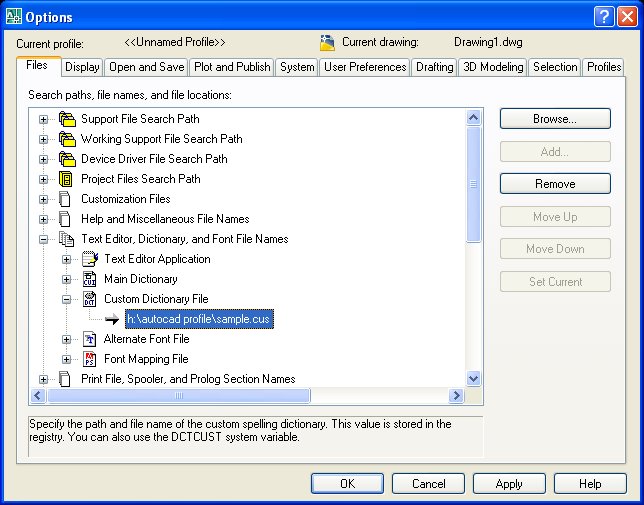


Now, I said all of that to get to this. I have people abbreviating 'typical' 4 different ways. It bugs me because I'm a control freak who likes consistent drawings. To help with the problem I have added commonly misspelled words to the custom dictionary before they even get it. I let spell check add the consistency for abbreviations and industry specific words for me.

Once you know where the custom dictionary is, just open it with Word Pad to edit.
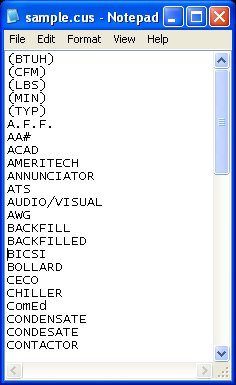
It's a real easy way to help your team stay consistent. Now if you really want to force the issue, redefine the plot command to run spell check first. Dang, I'm evil. I'll try to write a tutorial on redefining commands in the near future for those of you who are interested.

Wednesday, July 12, 2006

The Admin Pulldown Menu

As a CAD Administrator, I found that some users get in the kind of trouble that requires what I call “Base lining” of their setup. This means they have jacked up maybe the PGP file or system variables, or maybe they went into Options once and now nothing works. What this really means is I will probably have to spend more time than I want at this user’s station at with them hanging on me every minute because they have work to do.

Well, here is a tool that a buddy of mine thought up to help in these types of situations.

Quite simply it is a pull down menu that has some very special functions like Reload CUI, Baseline System Variables, Reinit PGP, Clean DWG File, Baseline Profile and what ever else you need here. It’s just there for your use.

I keep it a secret to prevent accidental base lining. I use the following lisp to automatically load it to any workstation I may need to use it at. The last item in my ADMIN pulldown calls the second lisp, which removes the pulldown.

This lets you sit down at anyone’s PC, type “admin” to load the menu, access what you need and then select the unload to unload it altogether. They never knew what hit them.

Next time I’ll throw out some functions you might find helpful to have on your Admin menu.

Load Admin menu
(defun c:admin ()
(setvar "cmdecho" 0)
(setvar "filedia" 0)
(if (not (menugroup "Administration"))
(progn
(command "menuload" "c:/AcmeCAD/menu/administration")
(menucmd "P16=+administration.pop1")
)
(prompt "\nThe Admin menu is already loaded!")
)
(setvar "cmdecho" 1)
(setvar "filedia" 1)
(princ "\nThe Administration Menu has been loaded.")
(princ)
)


Unload Admin menu
(defun c:unadmin ()
(setvar "cmdecho" 0)
(setvar "filedia" 0)
(if (not (menugroup "Administration"))
(prompt "\nThe Admin menu is not loaded!")
(progn
(command "menuunload" "Administration")
(princ "\nThe Adminstration menu has been unloaded.")
)
)
(setvar "cmdecho" 1)
(setvar "filedia" 1)
(princ)
)