Wednesday, February 27, 2008

Manual Object Array Trick

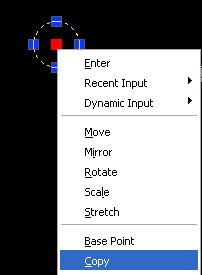
Here is a cool little trick to copy objects to sticky points on an invisible grid. Select the object you want to copy then click it's location grip. in this case the grip in the center of this circle. Then right click and pick "Copy".

Pick a point to the right to place the first copy. Now hold down the Ctrl key and move your mouse around. Notice that the circle is jumping to equal distance points as the first copy. You can place the circle as many columns or rows out as you like still hitting the even spacing, with the luxury of skipping points on the grid.
This can come in handy when laying out cubes, lights, diffusers, desks or other objects that are evenly spaced, or it just might be fun at CAD geek parties. Anyway, I know the ladies can't help but love a good CAD man.

Tuesday, February 19, 2008

Disappearing X References

I have been having a problem for a while with Xreferences disappearing from the drawing when bound, yet they still show up in the XRef Manager. I have noticed that if I unload they reference then reload it; it will show up again where it belongs, all the same, it will not bind.

I have heard lot's of explanations. The one I tend to go with is that there are duplicate blocks in the two files preventing the bind mid action leaving you with no visible reference.

Here is a list of possible fixes. Start at the top and work your way down. They get more bothersome as you go, but I haven't missed getting it to work eventually yet.
  1. Right click on the referenced file and pick Open Xref. Make some change like zoom extents, save and close. Reload when prompted in the original drawing then bind.
  2. Purge both drawings.
  3. Recover both drawings.
  4. If the referenced drawing has attached references, change them to Overlay and bind individually.
  5. Detach the reference file, purge and insert as a block.

Monday, February 11, 2008

Top 5 Rules for Engineers Dealing with Drafters

I swiped this list off the desk of one of our engineering techs.

  1. Never give me work in the morning. Always wait until 3:45 and then bring it to me. The challenge of a deadline is refreshing.
  2. If it's a rush job, run in and interrupt me every 10 minutes to inquire how it's going, or even better hover behind me advising every keystroke. That helps.
  3. If you give me more than one job, don't tell which has priority. I am psychic.
  4. If you have special instructions for a job, do not write them down. In fact save them until the job is almost done. No point in confusing me with useful information.
  5. Tell me about your little problems. No one else has any and it's nice to know someone is less fortunate. I especially like the story about having to pay so much tax on the bonus check for being such a good engineer.

Tuesday, February 05, 2008

Ramblings on Reward and Punishment

CAD Managers generally want to encourage growth in their CAD users. Here are some ideas I have either tried or heard of over the years.

One I heard about at the 10th Autodesk University in 2002. I forget the name of the instructor, but he helped run Disney's Imagineering. He regularly gave proficiency tests to his users and tracked their efficiency. The reward and punishment was this. At review time he might tell you there are 300 users here and you are number 12. I am giving you the old number 12's PC, which is much faster. He may also say you are number 300, I hope we do well this year for your sake. He also sorted his users into differing groups that got increasing benefits with rank. To some extent "good user = good PC" has happen most everywhere I have worked.

I also had a college professor that would hand out exams and papers highest grade first to lowest grade last. Everybody in class knew you did the worst or the best. This is a real good motivator to not be last.

In the end I think a happy employee can beat a talented one most any day. The ideal is to have a talented and happy employee. Every employee is different and is motivated by sometimes very different things.

So what really works? You do. A good CAD Manager not only knows what psltscale and ssmautoopen is, but is also a good judge of people, and can help them be the best they can be. A good CAD Manager will push when it is time to push and back off when it is time for that.
How do you know what time it is? 25% you are that kind of person, 75% experience. You been there, make it easier on them and it will pay you back 10 fold.